
18 appointment reminder templates for text and email
18 appointment reminder templates to copy for text, email and WhatsApp, when to send each one, and the text rules on length, consent and US numbers.
Send one email 24 hours before the appointment and one text 2 to 3 hours before. Each message needs the name, date and time, place or link, and a way to change the booking. Keep a text under 160 characters. Below are 18 templates to copy.
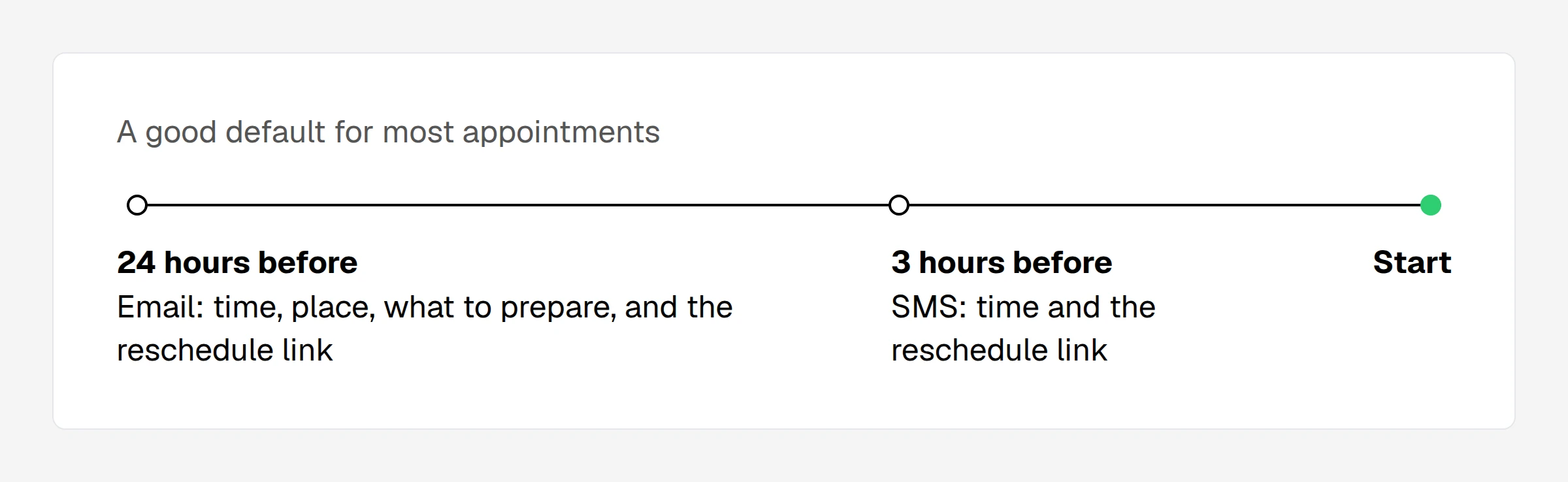
When to send appointment reminders
| Appointment | First | Second |
|---|---|---|
| Standard | 24 hours, email | 2 to 3 hours, text |
| With preparation | 3 days, email | 24 hours, email |
| Online meeting | 24 hours, email | 1 hour, text |
| Group session | 24 hours, email | None |
| Booked early | 1 week, email | 24 hours, text |
Time before the appointment. Booked early means more than 2 weeks ahead. This is our suggestion, not a study. Do not send before 8 am or after 8 pm in the client's time zone.
Start with 2 reminders. Add one only if people still miss appointments.
Appointment reminder text templates
Each one stays under 160 characters with sample details filled in.
Booking confirmation
Hi {First name}, your {Service} with {Company} is booked for {Date} at {Time}. To change it: {Link}
24 hours before
Hi {First name}, reminder: {Service} tomorrow at {Time} at {Place}. To change it: {Link}
2 to 3 hours before
{Company}: see you today at {Time} for your {Service}. Running late? Call {Phone}.
Online meeting
{Company}: your meeting starts at {Time}. Join here: {Join link}
Short, same day
Reminder: {Time} today at {Company}. Need to change it? {Link}
Ask to confirm
{Company}: your {Service} is {Date} at {Time}. Can you still make it? Confirm or change: {Link}
Missed appointment
Hi {First name}, we missed you today at {Company}. Book a new time here: {Link}
Appointment reminder email templates
24 hours before
Subject: Tomorrow at {Time}: your {Service}
Hi {First name},
Your {Service} with {Company} is on {Date} at {Time} at {Place}.
Need to change it? {Link}
{Your name}
With preparation
Subject: Please read before {Date}: your {Service}
Hi {First name},
Your {Service} is on {Date} at {Time} at {Place}.
Please bring: {Items}.
Need to change it? {Link}
{Your name}
Online meeting
Subject: {Service} at {Time}: your link
Hi {First name},
Join here: {Join link}
Dial in: {Dial-in}
Need a different time? {Link}
{Your name}
Product demo
Subject: Your {Product} demo at {Time}
Hi {First name},
We will cover: {Topics}.
Join here: {Join link}
Need a different time? {Link}
{Your name}
Group session
Subject: Tomorrow: {Service}
Hi {First name},
Your session starts at {Time} at {Place}.
Please bring: {Items}.
Can't come? {Link}
{Your name}
Team meeting
Subject: {Service} at {Time}
Hi team,
Where: {Place}
Agenda: {Topics}
{Your name}
Booking confirmation
Subject: Booked: {Service} on {Date}
Hi {First name},
You are booked for {Date} at {Time} at {Place}.
We will remind you the day before.
Need to change it? {Link}
{Your name}
Formal
Subject: Appointment reminder: {Date} at {Time}
Dear {First name},
We look forward to seeing you on {Date} at {Time} at {Place}.
To reschedule, please use this link: {Link}
Kind regards,
{Your name}, {Company}
Missed appointment
Subject: We missed you today
Hi {First name},
We missed you at your {Service} today. You can book a new time here: {Link}
{Your name}
WhatsApp reminder templates
Business messages that start a WhatsApp conversation need a template that Meta has approved. In Meta's form, write each field as a number, such as {{1}}.
Reminder
Hi {First name}, this is a reminder of your {Service} with {Company} on {Date} at {Time}. To change it, use this link: {Link}
Booking confirmation
Hi {First name}, your {Service} with {Company} is booked for {Date} at {Time}. To change it, use this link: {Link}
How to write a reminder
- Lead with the time. Put the date and time in the subject line or the first words.
- Name your company. A text from an unknown number looks like spam.
- Give one action. One link to change the booking.
- Skip "just a reminder". Write "Your appointment is tomorrow at 10:30 am".
Text message (SMS) rules
- Length. One segment holds 160 plain characters. A longer message splits into segments of 153, and you pay for each (Twilio docs).
- Emoji and other alphabets. One emoji or one Arabic letter cuts a segment to about 70 characters.
- US numbers. App messages from a normal US number must register for A2P 10DLC. Your scheduling tool may do this for you, so ask.
- Consent. Ask for consent at booking where the law requires it, and honor STOP.
- Privacy. Do not name a treatment, a medicine or a result. Say "your appointment". In health care, ask your compliance person about HIPAA.
Do reminders reduce no-shows?
We found no study behind the numbers that guides quote, so we give none. Measure it: count missed appointments for 4 weeks, turn on reminders, then count for 4 more.
Set up reminders in Sprintful
- Open Pages and select your booking page.
- Open Notifications and select Add New Notification.
- Set Trigger to Reminder and select the Reminder time, from 5 minutes to 3 days before.
- Set Type to Email, SMS or WhatsApp, and Target to Visitor.
- Write the subject and body, then select Send test notifications.
- Select Save. Changes apply to new bookings only.
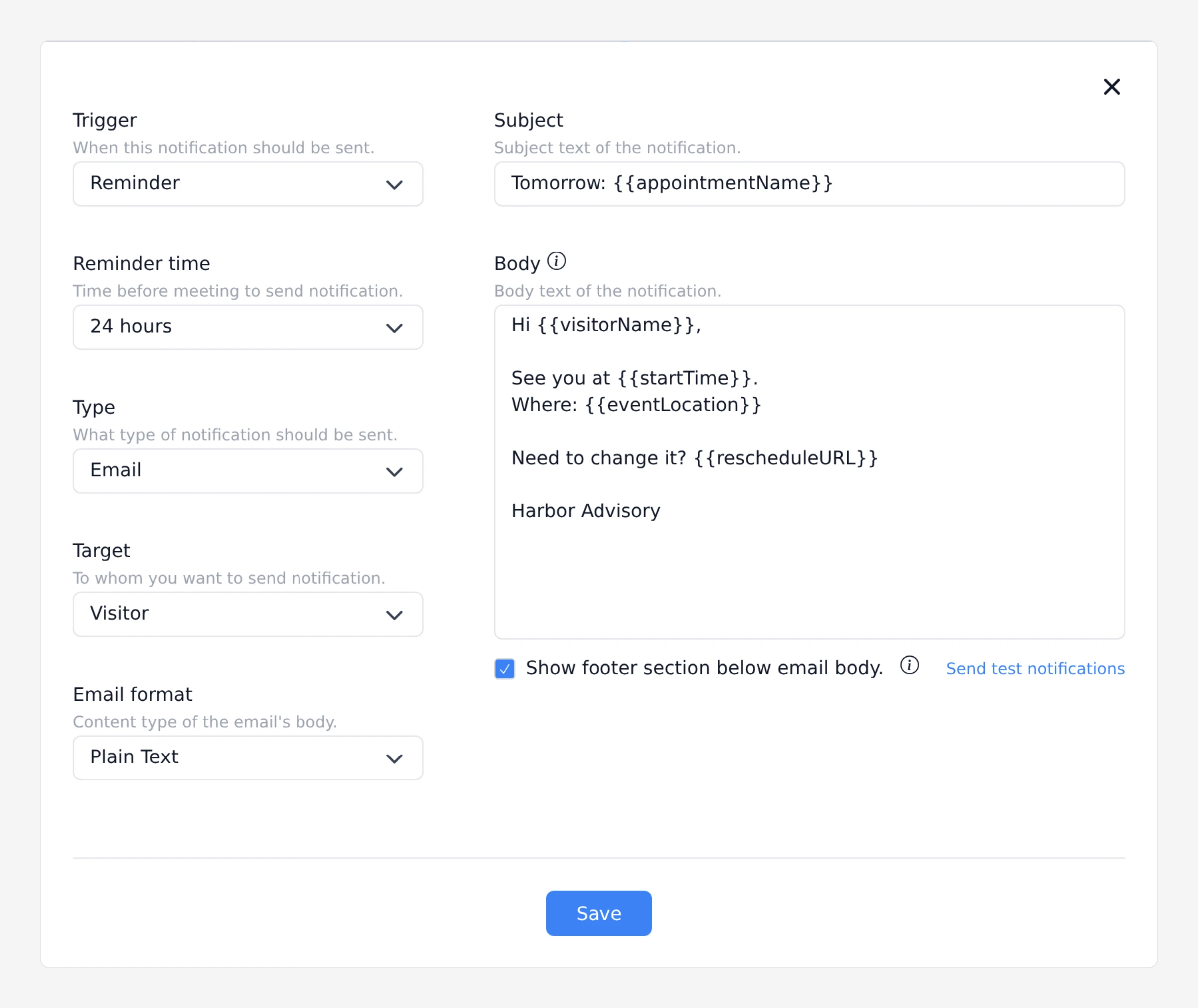
| Template | Variable |
|---|---|
| {First name} | {{visitorName}} |
| {Service} | {{appointmentName}} |
| {Date}, {Time} | {{startTime}} |
| {Place}, {Join link} | {{eventLocation}} |
| {Dial-in} | {{dialinInfo}} |
| {Link} | {{rescheduleURL}} |
| {Your name} | {{ownerName}} |
{{visitorName}} prints the full name that the visitor types. {{startTime}} prints the date and the time.
Plans include 50, 100 or 250 text credits a month on Basic, Professional and Business. WhatsApp needs Business, your WhatsApp Business account and approved templates (pricing). See notifications.
From Business up, clients pay in full at booking through Stripe. See pricing.
Common questions
What is a good reminder text?
"Hi Jordan, reminder: appointment tomorrow at 10:30 am at 12 Main St. To change it: {Link}". It has the name, time, place and one action.
How many reminders should I send?
Start with two.
How do I politely remind someone?
State the facts and offer a way to change it. You do not need to apologize.
